
Description
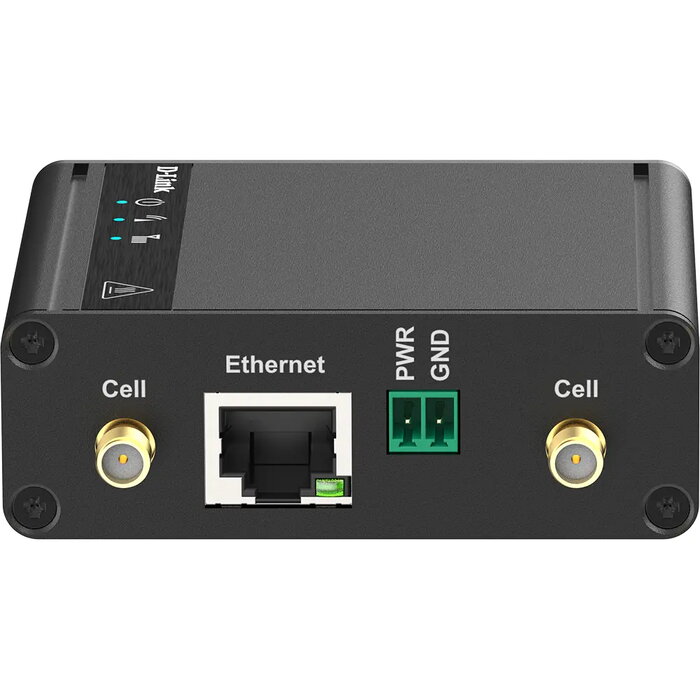
The D-Link DWM-311-G 5G M2M Modem is a compact industrial router with 5G connectivity and a 2.5 Gigabit Ethernet interface. Designed for machine-to-machine (M2M) applications such as EV charging stations and remote monitoring, it combines high data throughput, OpenVPN support and a rugged metal housing to provide reliable network access in demanding environments.
Advantages
The modem offers ultra-fast 5G speeds and low latency for real-time data exchange, secure VPN protection through OpenVPN for safe remote access, and automatic 4G/5G switching for stable connectivity. Its corrosion-resistant zinc-plated steel case and wide operating voltage range (VDC 5–32V) ensure durability and flexible power options. The single 2.5 Gigabit Ethernet port supports 10/100/1000/2500 Mbit/s rates, enabling high-throughput wired connections.
Suitable for
- EV charging station connectivity and remote management
- Industrial M2M telemetry and sensor data collection
- Remote site access where wired infrastructure is limited
- Applications requiring secured VPN connections and low-latency communications
Key specifications
- Model: D-Link DWM-311-G (MPN: DWM-311-G, EAN: 0790069469718)
- Cellular: 5G with 4G fallback and automatic switching
- Ethernet: 1 × RJ-45 2.5 Gigabit port (10/100/1000/2500 Mbit/s)
- Modem throughput figure (manufacturer data): 445644 Kbit/s
- Security: OpenVPN support
- Power: wide input voltage VDC 5–32V
- Construction: corrosion-resistant zinc-plated steel case; compact dimensions 77.4 × 68.5 × 26 mm
- Colour: Black
How to use
Insert a Micro‑SIM card, connect a compatible power source within the VDC 5–32V range, and power up the unit. Connect your device to the modem using the 2.5 Gbit/s Ethernet port and configure network parameters or VPN settings via the device management interface. The modem will automatically select between 5G and 4G networks as needed, providing immediate remote access and real‑time monitoring capabilities for connected equipment.
Usage recommendations
Install the modem in a well-ventilated, protected location and use a stable power supply within the specified voltage range. For secure remote access, enable and configure OpenVPN. For outdoor or harsh environments, verify antenna placement and cellular signal strength before final mounting to ensure reliable connectivity.
There are no reviews yet.