
Description
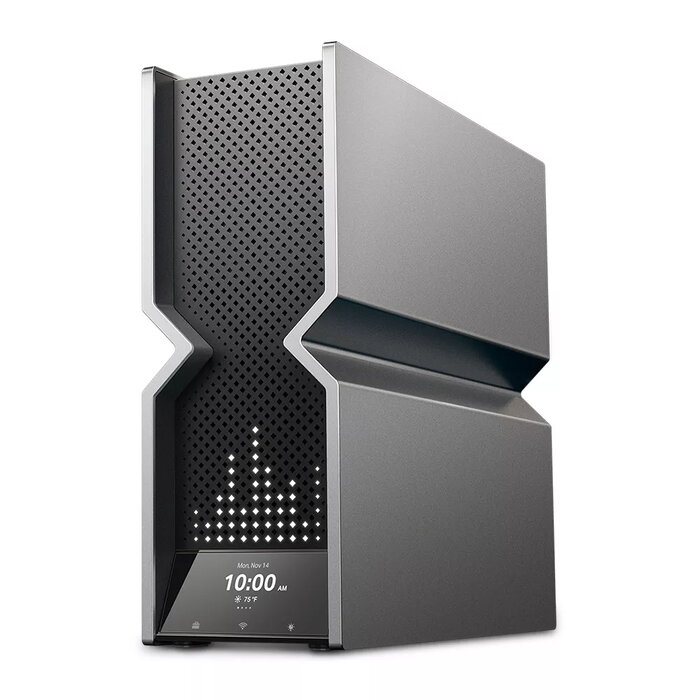
The TP-Link Archer BE900 is a tabletop quad-band Wi‑Fi 7 (802.11be) router offering combined theoretical throughput up to 24.4 Gbps. It supports four simultaneous frequency bands (2.4 GHz, two 5 GHz bands and 6 GHz) and features 12 internal antennas, multi‑gigabit Ethernet ports and current security standards including WPA3. The router is designed for whole‑home coverage, mesh expansion via EasyMesh/OneMesh compatibility and centralized management through the Tether app or web interface.
Advantages
Archer BE900 delivers high aggregate bandwidth with a 16‑stream quad‑band design and support for 320 MHz channels and 4K‑QAM to increase per‑device throughput. The 6 GHz band reduces congestion for compatible devices while dual 5 GHz bands keep existing clients on high‑speed links. Twelve internal, optimally positioned antennas and proprietary RF optimization improve coverage, isolation and stability. The metallic, V‑fold case with a larger heat sink helps thermal performance and fits modern interiors. Built‑in HomeShield services, VPN client/server support and a dedicated IoT network provide advanced security and flexible network segmentation.
Suitable for
- Multi‑device homes requiring multi‑gigabit Wi‑Fi for 4K/8K streaming and cloud gaming
- Small offices needing high throughput and wired multi‑gigabit LAN connections
- Homes with Wi‑Fi dead zones that will be expanded using EasyMesh or OneMesh nodes
- Users who require integrated security features (WPA3, HomeShield) and VPN support
Key specifications
- Wi‑Fi standard: Wi‑Fi 7 (802.11be)
- Bands: Quad‑band — 2.4 GHz / 5 GHz‑1 / 5 GHz‑2 / 6 GHz
- Maximum wireless throughput: up to 24.4 Gbps (aggregate)
- Streams: 16‑stream quad‑band
- Channel width: up to 320 MHz
- Modulation: 4K‑QAM
- Antennas: 12 internal antennas
- Ethernet: Multi‑Gigabit LAN (including 1 Gbps, 2.5 Gbps, 10 Gbps options as supported by ports)
- USB: Yes
- Security: WPA3, HomeShield features (parential controls, network scanner, QoS, IoT network)
- Management: Tether app and web UI, EasyMesh/OneMesh compatible
- Color: Grey, Black
How to use
Place the Archer BE900 on a stable tabletop in a central location for best coverage. Connect your modem to the WAN port and attach wired devices to the LAN ports as needed. Use the Tether mobile app or the router web interface to perform the initial setup: create an admin account, configure SSIDs for the quad bands (or use a single SSID), set passwords and enable WPA3. If you need wider coverage, add EasyMesh or OneMesh compatible nodes and follow the Tether/app instructions to form a mesh system. For VPN use, configure VPN client or server settings in the web UI according to your provider or remote network requirements.
Usage recommendations
For optimal performance, enable WPA3 encryption, keep firmware up to date via OTA updates, place the router away from large metal objects and microwave sources, and use the 6 GHz band for compatible devices to reduce congestion. Use the dedicated IoT network to isolate smart home devices and apply HomeShield parental controls and QoS to prioritize critical devices.
There are no reviews yet.