
Description
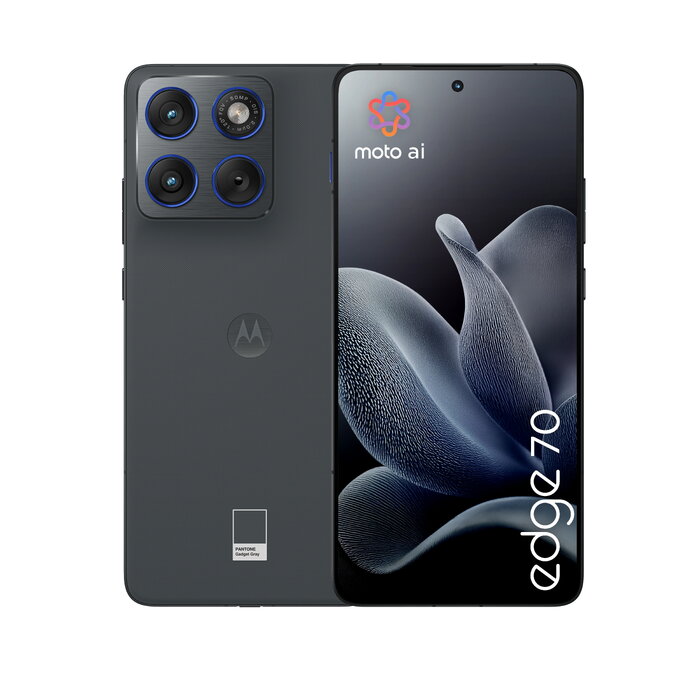
Discover the motorola edge 70, an ultrathin 6.7″ (17 cm) smartphone that combines aircraft‑grade aluminum construction, Pantone®‑validated finishes and advanced imaging with three 50 MP lenses. Powered by the Qualcomm Snapdragon 7 Gen 4 platform and Android 16.0, it delivers smooth performance, up to 12 GB RAM and 512 GB storage, a 4800 mAh silicon‑carbon battery with wireless charging, and durable protection including IP68/IP69 and Corning® Gorilla® Glass 7i.
Advantages
The motorola edge 70 pairs a lightweight, premium aluminum frame with a large Super HD 2712×1220 display and very high peak brightness for clear viewing in diverse lighting conditions. Its triple 50 MP camera system and moto ai features optimise colour fidelity and skin tones for reliable photos. The silicon‑carbon battery provides long runtime in a thin profile, while military‑grade durability and dual underwater protection help protect the device during everyday use.
Suitable for
- Photography and content creation using multiple 50 MP lenses
- Multimedia and streaming on a 6.7″ Super HD display
- Productive multitasking with Snapdragon 7 Gen 4 and 12 GB RAM
- Frequent travellers who need durable, water‑resistant hardware
- Users requiring large local storage up to 512 GB
Key specifications
- Display: 17 cm (6.7″), 2712 × 1220 pixels, Super HD
- Processor: Qualcomm Snapdragon 7 Gen 4
- Memory & Storage: 12 GB RAM, 512 GB internal storage
- Cameras: Dual rear 50 MP + 50 MP; front 50 MP
- Battery: 4800 mAh silicon‑carbon (Si‑C), wireless charging supported
- Operating system: Android 16.0
- Connectivity: 5G, Dual SIM (NanoSIM + eSIM), Wi‑Fi 4/5/6/6E, Bluetooth 5.4, NFC
- Durability: IP68, IP69, Corning® Gorilla® Glass 7i, military‑grade tests
- Weight: 159 g; Colour: Grey
How to use
Insert a NanoSIM or activate eSIM, charge the battery via the USB‑C port or wirelessly, and follow the Android 16.0 setup assistant to restore accounts and apps. Use the camera app with moto ai enhancements to capture photos and adjust Pantone‑validated colour profiles as needed. Manage storage in Settings and enable cloud backups if you need additional off‑device space.
Usage recommendations
For best photo results, enable moto ai and shoot in good lighting or use the Super HDR mode for high‑contrast scenes. Keep firmware up to date and use a protective case to preserve the aluminium finish; although the device has high IP and durability ratings, routine care extends long‑term performance.
There are no reviews yet.