
Description
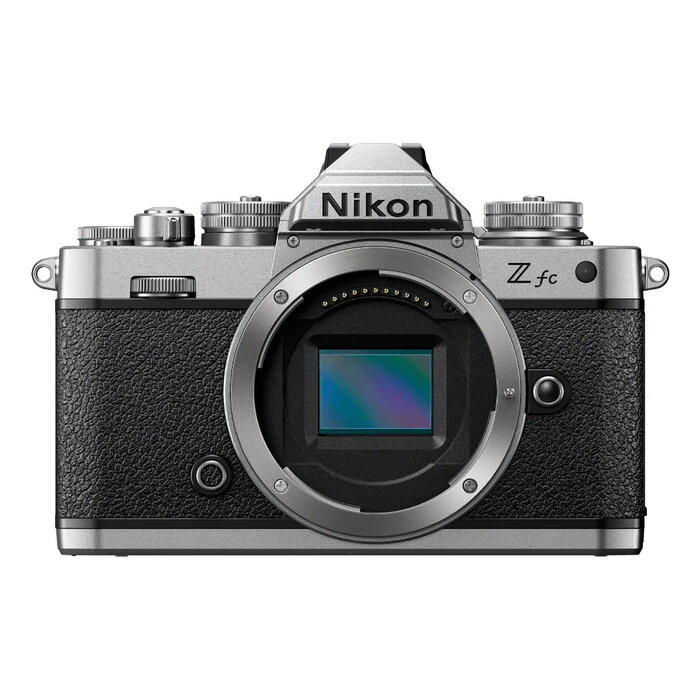
The Nikon Z fc is a compact mirrorless interchangeable-lens camera (MILC) that combines a classic, film-inspired design with modern imaging technology. It features a 20.9 MP CMOS sensor, 4K Ultra HD video recording, a 3″ touchscreen vari-angle monitor and an electronic viewfinder. Lightweight and durable with a magnesium alloy body, the Z fc offers a tactile control layout and a choice of exterior colours to suit personal style.
Advantages
The Z fc pairs heritage aesthetics with contemporary performance: engraved branding, mechanical-style control dials and textured finishes deliver a tactile shooting experience while Eye-Detection AF and Animal Detection AF2 improve subject tracking for stills and video. High ISO sensitivity up to 51,200 enables better low-light shooting, and 4K UHD recording plus slow-motion options provide versatile video capabilities. The camera’s compact size and vari-angle TFT LCD make framing, vlogging and self-portraits easier, and SnapBridge plus Webcam Utility simplify file transfer and remote streaming.
Suitable for
- Street and travel photography where a compact, stylish camera is preferred
- Content creators and vloggers using 4K video and vari-angle screen
- Portrait and pet photography benefiting from Eye-Detection AF and Animal Detection AF2
- Everyday photographers who value tactile controls and a lightweight body
Key specifications
- Sensor: 20.9 MP CMOS
- Maximum image resolution: 5568 x 3712
- Video: 4K Ultra HD recording
- ISO sensitivity: up to 51,200
- Monitor: 3″ TFT touchscreen vari-angle
- Shutter: up to 1/4000 s
- Body material: magnesium alloy; weight approx. 390 g
- Colour: Black, Silver
- Connectivity and software: SnapBridge, Webcam Utility
How to use
Attach a compatible NIKKOR Z lens or use a Mount Adapter FTZ to access F-mount lenses, then power on the camera and set the mode appropriate for your shooting (still or movie). Use the top dials for quick adjustments of ISO, shutter speed and exposure, and compose using the electronic viewfinder or the vari-angle touchscreen. For portraits or pet shots enable Eye-Detection AF or Animal Detection AF2. For video, choose 4K resolution and AF-F movie mode to maintain continuous focus while recording. Transfer images and video to a smartphone with SnapBridge or connect to a computer with Webcam Utility for streaming.
Usage recommendations
For best results, use native NIKKOR Z lenses to take full advantage of autofocus performance and image quality. When shooting in low light, increase ISO cautiously and consider using a lens with wider aperture. Keep firmware and SnapBridge/Webcam Utility updated to ensure compatibility and access to the latest features.
There are no reviews yet.