
Description
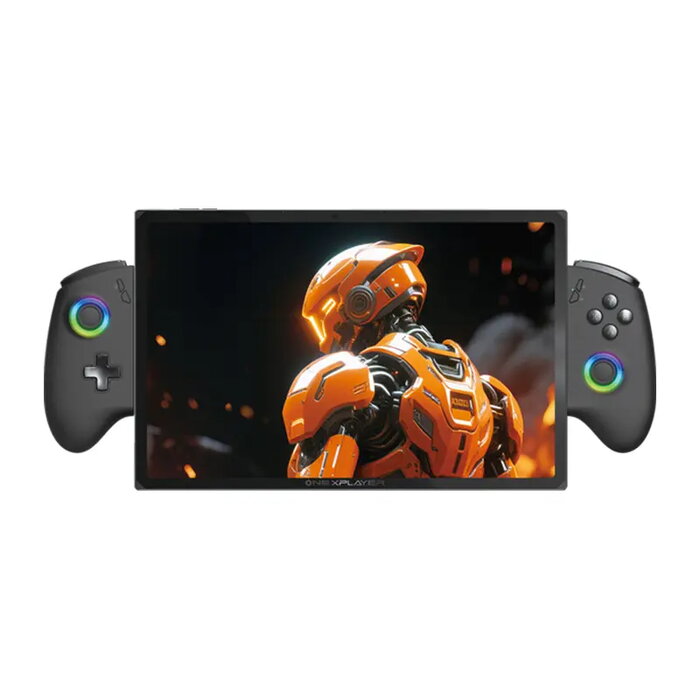
The OneXPlayer X1 Air is a portable 3-in-1 device that combines a handheld console, tablet and compact laptop. It is powered by an Intel Core Ultra 7 258V processor and equipped with a 10.95-inch LTPS touchscreen (2560×1600, 120 Hz), Intel Arc 140V integrated graphics, 32 GB LPDDR5x RAM and a 2 TB PCIe 4.0 SSD. The unit includes split controller support, OneXConsole software, Harman-certified stereo audio and Windows 11, making it suitable for gaming, multimedia playback and mobile productivity in one lightweight aluminum chassis.
Advantages
High-performance mobile CPU with dedicated AI acceleration, powerful integrated graphics with XeSS 2.0 support, and a high-resolution 10.95″ display with 120 Hz refresh rate provide smooth visuals for games and video. Large 32 GB RAM and a fast 2 TB PCIe SSD ensure quick loading times and comfortable multitasking. The device offers flexible usage modes (handheld, tablet, laptop with magnetic keyboard) and a refined cooling system to sustain performance. Built-in split controllers with Hall Effect joysticks, Harman audio and a wide set of ports improve playability and connectivity.
Key specifications
- Manufacturer: OneXPlayer
- Model: X1 Air
- Processor: Intel Core Ultra 7 258V, 8C/8T, up to 4.80 GHz, 12 MB cache
- Graphics: Intel Arc Graphics 140V, up to 1.95 GHz, 64 TOPS AI compute
- NPU: Intel AI Boost, 47 TOPS
- RAM: LPDDR5x 8533 MHz, 32 GB
- Storage: M.2 2230 PCIe 4.0 x4 SSD, 2 TB (expandable via additional PCIe Mini SSD slot)
- Display: 10.95″ LTPS, 2560×1600 (16:10), 120 Hz, 10-point touch, sRGB 138%
- Battery: 72.77 Wh
- Ports: 2× USB-C 4.0, 1× USB-A 3.2, 1× TF card slot (up to 2 TB), 1× Mini PCIe 4.0 SSD slot, 3.5 mm jack
- Connectivity: Wi‑Fi 7, Bluetooth 5.2
- Audio: Dual speakers, Harman certification
- Operating system: Windows 11
- Dimensions & weight: 252 × 163.5 × 13.5 mm, ~892 g (with controllers)
How to use
Use the X1 Air in handheld mode for gaming with the detachable split controllers attached to the sides, or remove them to use the device as a tablet. Attach the magnetic keyboard via pogo pins to switch to a laptop-like workflow for typing and office tasks. Control performance and cooling profiles, map buttons or enable gyro simulation through the OneXConsole application; adjust screen brightness and resolution as needed. Connect external displays, storage or peripherals via the USB-C/USB-A ports and insert a TF card or optional Mini SSD to expand storage.
Recommendations
For best gaming and multitasking results, keep system firmware and OneXConsole software up to date, use the Turbo mode when sustained performance is required, and ensure good ventilation around the device during extended sessions. Use the included controls and Hall Effect joysticks calibration in OneXConsole for optimal input accuracy.
There are no reviews yet.