
Description
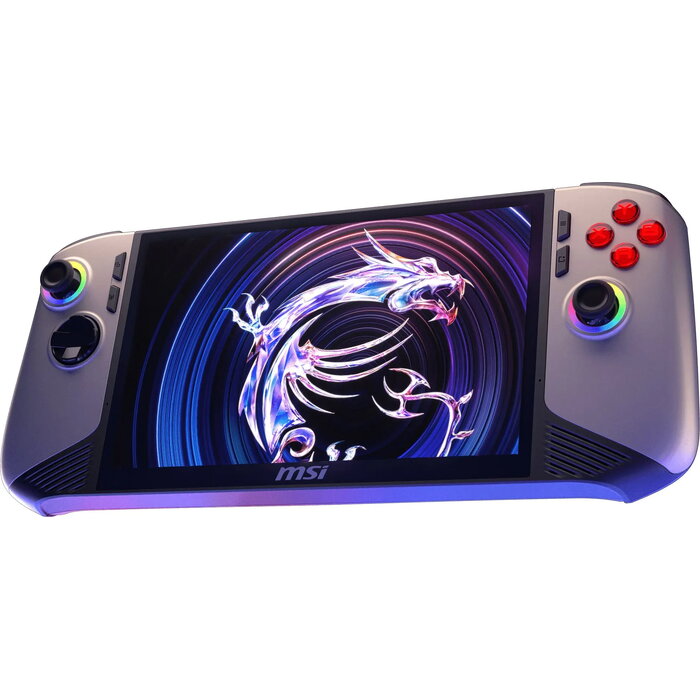
Handheld gaming console MSI Claw 8 AI+ A2VM-037PL with an 8‑core processor (base 1.4 GHz, boost up to 4.8 GHz) and Intel Arc graphics. The device includes 32 GB LPDDR5x memory with 8533 MHz clock speed, a 1 TB PCIe 4.0 SSD, and an 8″ (20.3 cm) IPS‑level touchscreen with 1920 × 1200 resolution, Full HD+ image, 120 Hz maximum refresh rate and 500 cd/m² brightness. The console runs Windows 11 Home and offers Wi‑Fi 7 and Bluetooth 5.4 connectivity, a fingerprint reader, microSD card slot and dual Thunderbolt 4 ports. The battery capacity is 80 Wh and the AC adapter rated at 65 W.
Advantages
The MSI Claw 8 AI+ combines a high‑frequency 8‑core processor and Intel Arc graphics for portable gaming performance, fast LPDDR5x memory for responsive multitasking, and a high‑refresh IPS‑level touchscreen for smooth visuals. A 1 TB PCIe 4.0 SSD provides rapid storage and loading times, while Thunderbolt 4 ports and Wi‑Fi 7 ensure modern connectivity. The device is compact and lightweight for a handheld system and includes a fingerprint reader for quick access.
Suitable for
- Portable PC gaming and cloud gaming
- Playtesting and development of games on the go
- Media playback and streaming in Full HD+
- General productivity and multitasking
- Expandable storage via microSD cards
Key specifications
- Processor: 8 cores, base 1.4 GHz, boost up to 4.8 GHz
- Graphics: Intel Arc
- Memory: 32 GB LPDDR5x, 8533 MHz
- Storage: 1 TB SSD, PCIe 4.0 interface
- Display: 8″ (20.3 cm) IPS‑level touchscreen, 1920 × 1200, 120 Hz, 500 cd/m²
- Operating system: Windows 11 Home, 64‑bit
- Battery: 80 Wh; AC adapter: 65 W
- Wireless: Wi‑Fi 7 (802.11be), Bluetooth 5.4
- Ports: 2 × Thunderbolt 4, combo headphone/mic jack
- Weight and dimensions: 299 mm × 126 mm × 24 mm, weight 795 g
- Other: Fingerprint reader, analogue and digital controls, shoulder buttons, analogue thumbsticks, built‑in stereo speakers (2 × 2 W)
How to use
Charge the console using the supplied 65 W AC adapter until the battery reaches full capacity. Power on the device and complete the Windows 11 Home initial setup, including user account and fingerprint registration if required. Insert a microSD card into the integrated card reader to expand storage, connect to a Wi‑Fi 7 network or pair Bluetooth devices for online play and peripherals, then launch games or applications from the installed SSD. Use the built‑in analogue thumbsticks, shoulder buttons and menu button for game control and adjust display or performance settings in Windows or game software as needed.
Usage recommendations
For best battery life and thermal performance, keep firmware and graphics drivers updated, use airplane or low‑power modes when not gaming, and avoid blocking air vents. Use high‑quality microSD cards for additional storage and a suitable USB‑C/Thunderbolt 4 charger for external power delivery when required. Do not dispose of the device in regular waste.

There are no reviews yet.