
Description
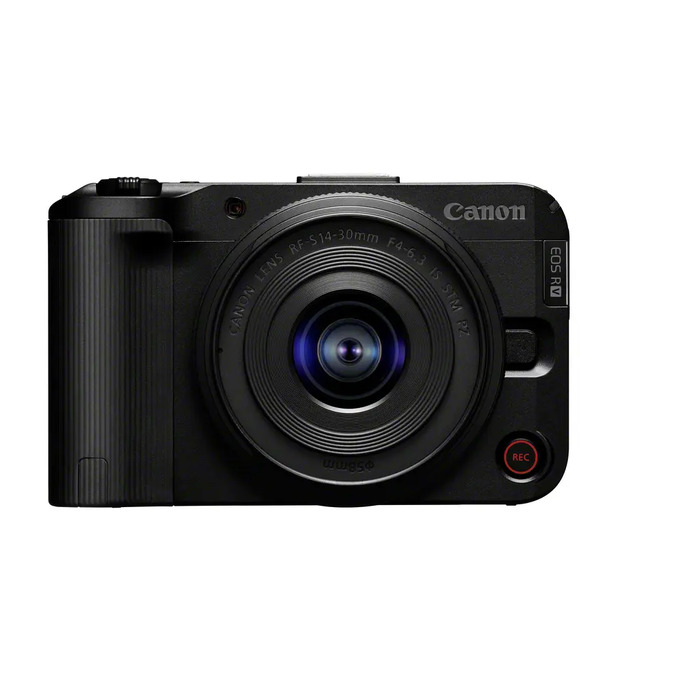
EOS R50 V is a compact interchangeable-lens mirrorless camera (MILC) with a 24.2 MP CMOS sensor and 4K 60p recording. Designed for video-first creators, it offers Canon Log 3, customizable picture profiles, advanced Dual Pixel CMOS AF, and a vari-angle touchscreen to simplify vlogging, streaming and on-location filming. The camera supports oversampled 4K from 6K, Full HD up to 120p with audio, 4:2:2 10-bit recording, and wireless transfer via Wi‑Fi, Bluetooth or USB.
Advantages
EOS R50 V provides flexible video tools such as Canon Log 3 for extended dynamic range, custom colour profiles for consistent colour grading, and subject-detection autofocus for reliable tracking. Its compact body, vari-angle touchscreen and dedicated recording buttons make solo filming and vertical shooting straightforward, while advanced stabilisation (with compatible RF-S lenses) and Movie Digital IS help deliver steady handheld footage. Fast data transfer and live-streaming shortcuts streamline sharing and workflow.
Suitable for
- Vlogging and solo content creation
- Live streaming and online broadcasts
- Travel and run-and-gun video production
- Short films and social media clips with vertical or horizontal formats
Key specifications
- Sensor: 24.2 MP CMOS
- Video: 4K up to 60p (oversampled from 6K); Full HD up to 120p with audio
- Recording formats: Canon Log 3; 4:2:2 10-bit available
- Autofocus: Dual Pixel CMOS AF with subject detection
- Display: 3.0″ vari-angle touchscreen
- Connectivity: Wi‑Fi, Bluetooth, USB
- Body colour: Black
- Maximum image resolution: 6000 x 4000
How to use
Set the camera to your desired recording format and enable Canon Log 3 or a custom picture profile if you plan to grade footage in post. Use the vari-angle touchscreen to frame yourself for vlogs or switch to vertical orientation using the dedicated tripod mount. Start recording by pressing the front or top record button; rely on subject-detection AF for continuous focus while moving. For smoother handheld shots, mount a compatible RF-S stabilised lens and enable Movie Digital IS. Transfer files via Wi‑Fi, Bluetooth or USB for quick editing and sharing.
Usage recommendations
For best results when grading, expose conservatively to retain highlights while using Canon Log 3. Use a stabilized RF-S lens (for example RF-S14-30mm F4-6.3 IS STM PZ) for walk-and-talk vlogging, and enable Movie Digital IS when shooting handheld to reduce shake. Charge the camera or connect to power for long streaming sessions and use the Live shortcut to begin broadcasting quickly.
There are no reviews yet.