
Description
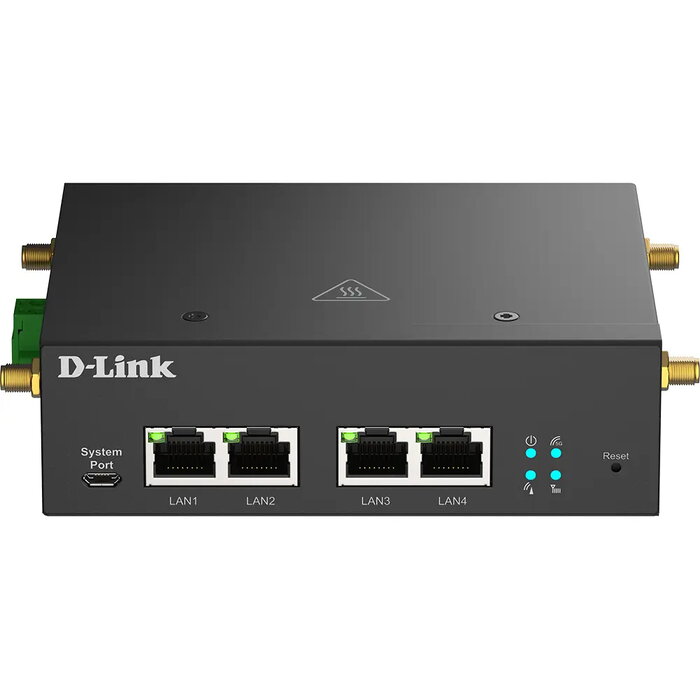
The D-Link DWM-314-G 5G Multi-Connect 802.11ax router is a 5G modem designed for machine-to-machine (M2M) connectivity, providing high-speed 5G and seamless 4G fallback. It includes four Gigabit Ethernet ports supporting 10/100/1000 Mbit/s, dual Micro-SIM slots for carrier redundancy, and VPN support (OpenVPN, WireGuard) to protect data in transit. The device is built for compact and space-constrained installations with wall and DIN-rail mounting options and a corrosion-resistant zinc-plated steel case for industrial use.
Advantages
The DWM-314-G delivers ultra-fast 5G data rates and low latency while offering automatic failover between SIMs for continuous connectivity. Built-in four Gigabit Ethernet ports reduce the need for external switches and extra power lines. Dual SIM support with seamless 4G/5G switching increases reliability. VPN support (OpenVPN, WireGuard) secures remote communications. The industrial-grade casing and wide operating conditions provide reliable performance in demanding environments.
Suitable for
- Smart parking poles and smart city sensors
- Kiosks, ATMs and payment terminals
- Remote terminals and M2M installations requiring reliable connectivity
- Locations with limited space where integrated Ethernet ports reduce additional hardware
Key specifications
- Model: D-Link DWM-314-G
- Wireless standard: 802.11ax
- Cellular: 5G with seamless 4G fallback
- Ethernet: 4 × Gigabit LAN (10/100/1000 Mbit/s)
- SIM: Dual Micro-SIM (3FF) slots
- VPN: OpenVPN, WireGuard
- Product colour: Black
- Mounting: Wall and DIN-rail
- Power: DC
How to use
Install the modem by mounting it on a wall or DIN-rail in a location with adequate cellular coverage. Insert one or two Micro-SIM (3FF) cards into the dual SIM slots to enable primary and failover connections. Connect devices via the four Gigabit Ethernet ports and apply DC power. Use the device web interface or management tools to configure network settings, VPN (OpenVPN or WireGuard), and failover rules. Verify connectivity and remote access after initial setup.
Usage recommendations
Place the router where cellular signal strength is optimal and avoid obstructions; configure both SIMs for different carriers to maximize redundancy. Keep firmware updated and enable VPN for secure remote management. For best results in noisy environments, use the integrated Ethernet ports to minimize external cabling and additional switches.
There are no reviews yet.