
Description
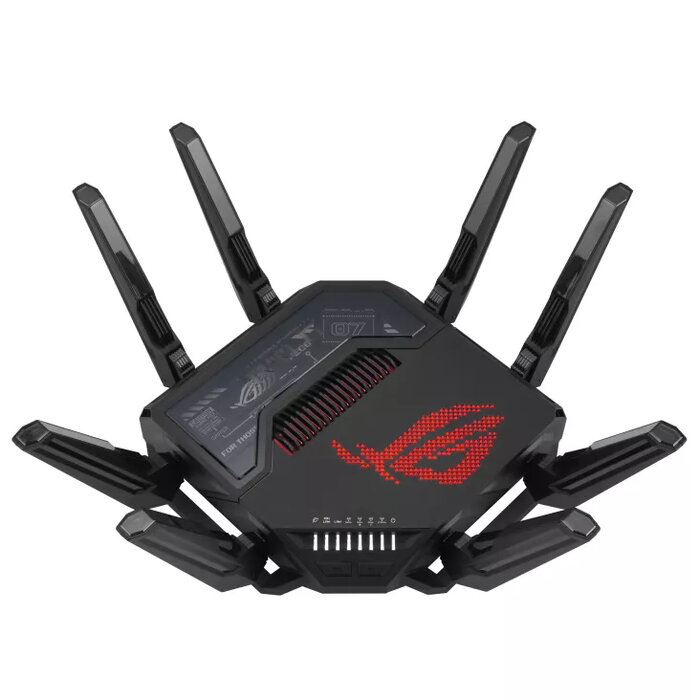
The ASUS ROG Rapture GT-BE98 is a tabletop quad-band Wi‑Fi 7 router designed for demanding gaming and next‑generation networking. Supporting Wi‑Fi 7 (IEEE 802.11be) across 2.4 GHz, two 5 GHz bands and 6 GHz, the GT-BE98 delivers multi-gigabit performance with a maximum WLAN throughput reported up to 11529 Mbit/s and dual 10 Gbps Ethernet ports. A quad-core 2.6 GHz CPU and a dedicated Wi‑Fi chipset enable sustained high-speed connections for cloud gaming, cloud AI, and other intensive online tasks, while a robust antenna array and advanced cooling help maintain stable wireless coverage.
Advantages
The GT-BE98 combines Wi‑Fi 7 features such as 320 MHz channels, 4K‑QAM and Multi‑Link Operation with hardware optimizations — including eight external antennas plus internal dipole elements and independent high‑power amplifiers — to reduce latency and improve reliability. Dual 10Gbps ports and multi-gig Ethernet support allow for high-throughput wired connections, and commercial‑grade AiProtection Pro provides network‑level security. The router’s reinforced aluminum top, enhanced heat spreader and venting improve thermal performance to preserve throughput under heavy load.
Suitable for
- High‑frame‑rate PC and console gaming with low latency
- Cloud gaming, cloud AI workloads and next‑gen streaming
- Homes or small offices requiring multi‑gigabit wired and wireless connectivity
- Environments needing advanced network security and VPN support
Key specifications
- Wi‑Fi standard: Wi‑Fi 7 (IEEE 802.11be); backward compatible with Wi‑Fi 6/6E/5/4
- Wi‑Fi bands: Quad‑band — 2.4 GHz / 5 GHz‑1 / 5 GHz‑2 / 6 GHz
- Maximum WLAN data rate (manufacturer reported): up to 11529 Mbit/s
- CPU: Quad‑core 2.6 GHz
- Ethernet: Dual 10 Gbps ports; LAN speeds supported: 10 / 100 / 1000 / 2500 / 10000 Mbit/s; total 6 RJ‑45 LAN ports
- Antennas: 8 external antennas plus internal dipole elements
- Security: WPA3 support and AiProtection Pro (Trend Micro)
- USB: Yes
- Colour and weight: Black; approx. 1.97 kg
How to use
Place the GT‑BE98 on a stable tabletop in an open area for best wireless coverage and connect the WAN port to your modem or uplink. Power on the router and follow the ASUS Router mobile app or web interface setup wizard to configure Internet settings, create wireless SSIDs for each band and enable security options such as WPA3 and AiProtection Pro. Use the app to enable Mobile Game Mode, set up OpenNAT for consoles, and assign QoS or port forwarding rules. For multi‑gig wired devices, connect to the 10Gbps Ethernet ports and verify link speeds in the router UI.
Usage recommendations
Position the router centrally and elevated for optimal coverage, keep firmware updated via the ASUS interface, and monitor device and traffic priorities using the mobile app to reduce latency during gaming and bandwidth‑intensive tasks.
There are no reviews yet.